

When buying products from China, international shipping cost is often the most unpredictable part of the process. Product prices may look cheap, but without a reliable shipping calculator or freight cost estimator, it’s easy to underestimate the final expense.
This guide explains how different China shopping agents calculate shipping costs, compares four popular shipping calculators, and helps you choose the most suitable freight calculator based on your needs.
What Is a Shipping Calculator and Why It Matters
A shipping calculator (also called a freight calculator or shipping cost estimator) is a tool used to estimate the international shipping fee before placing an order.
A good shipping calculator helps you:
- Get a realistic shipping estimate before purchasing
- Compare different shipping lines and delivery speeds
- Understand whether volumetric weight affects your shipping cost
- Avoid unexpected freight charges after warehouse packing
Most platforms now provide a shipping fee estimation tool, so below we’ll take a closer look at how the shipping calculators from Superbuy, Mulebuy, Kakobuy, and Sugargoo work in practice.
How to Use Superbuy Shipping Calculator
Superbuy offers one of the most detailed shipping calculators among Chinese shopping agents.
Step 1: Access the Superbuy Shipping Calculator
Step 1: Access the Superbuy Shipping Calculator
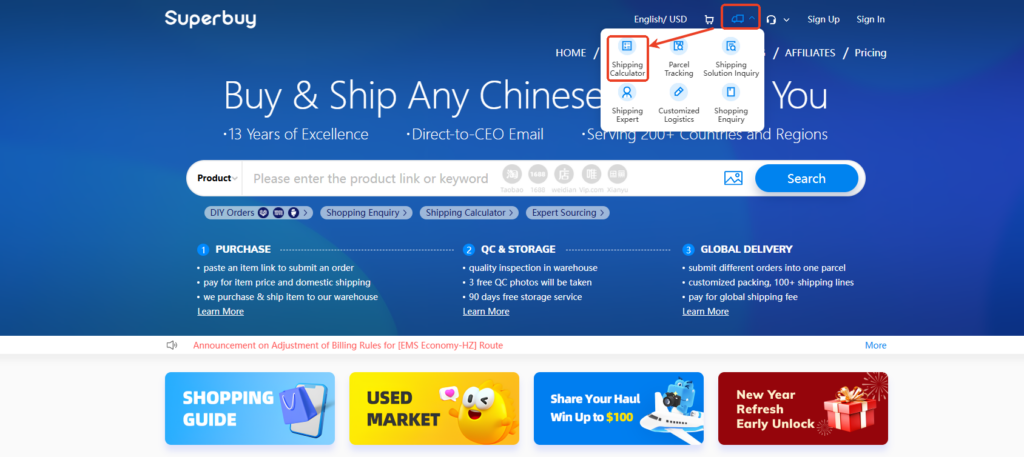
There are two ways to enter the Shipping Calculator on Superbuy:
- Top navigation menu → Click the calculator icon → Select Shipping Calculator
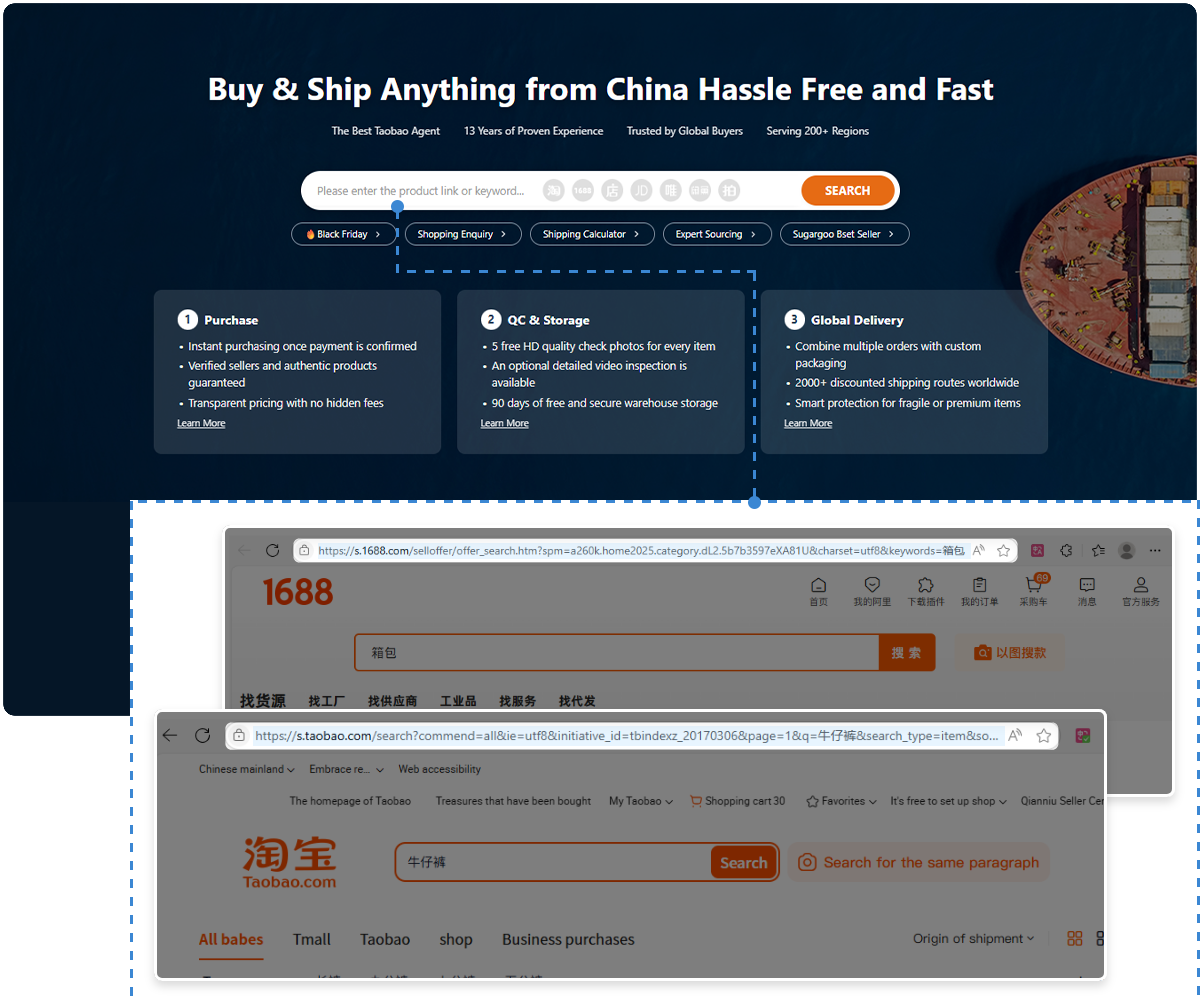
- Or directly from the homepage, click the “Shipping Calculator” button below the search bar
Both methods lead to the same calculator page, so users can choose whichever is more convenient.
👉 Tip: This is useful for first-time users who want to estimate shipping costs before placing any order.
Step 2: Select Destination Country and Basic Package Info
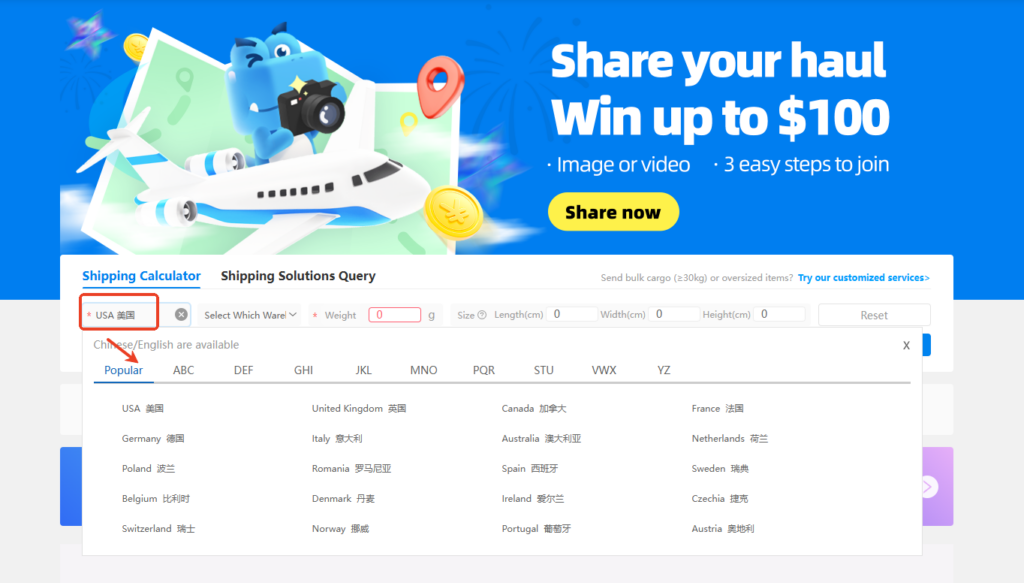
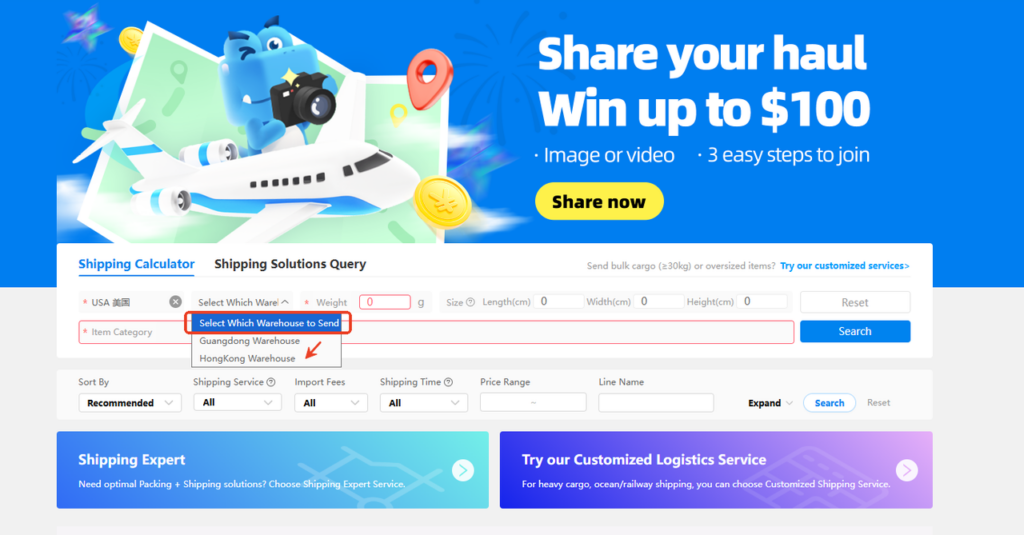
Once inside the Shipping Calculator page, you’ll need to input the core shipping details:
- Destination country
- Choose your country (e.g. USA, UK, Canada, Australia, EU countries)
- The country list supports English and Chinese
- Select warehouse
- Options usually include:
- Guangdong Warehouse
- Hong Kong Warehouse
- This affects available shipping lines and prices
- Options usually include:
- Enter weight and size
- Weight (in grams)
- Optional but recommended:
- Length (cm)
- Width (cm)
- Height (cm)
📌 Why size matters: Many shipping lines calculate volumetric weight, so entering dimensions gives a more accurate estimate.
Step 3: Choose Item Category (Important for Accuracy)
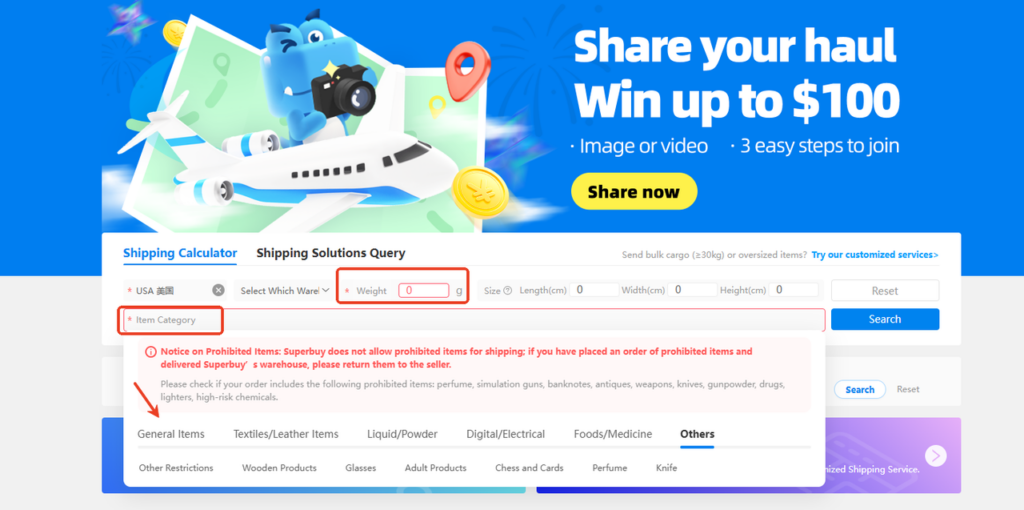
Superbuy requires users to select an Item Category, which directly affects:
- Available shipping lines
- Whether the item is restricted
- Final shipping cost
Common categories include:
- General Items
- Textiles / Leather
- Digital / Electrical
- Liquid / Powder
- Food / Medicine
- Others (e.g. perfume, adult products, knives)
⚠️ Superbuy also displays a Prohibited Items Notice, reminding users that certain goods cannot be shipped internationally.
👉 Best practice: Always choose the closest matching category to avoid failed estimates or unavailable shipping lines later.
Step 4: View Shipping Options & Cost Comparison
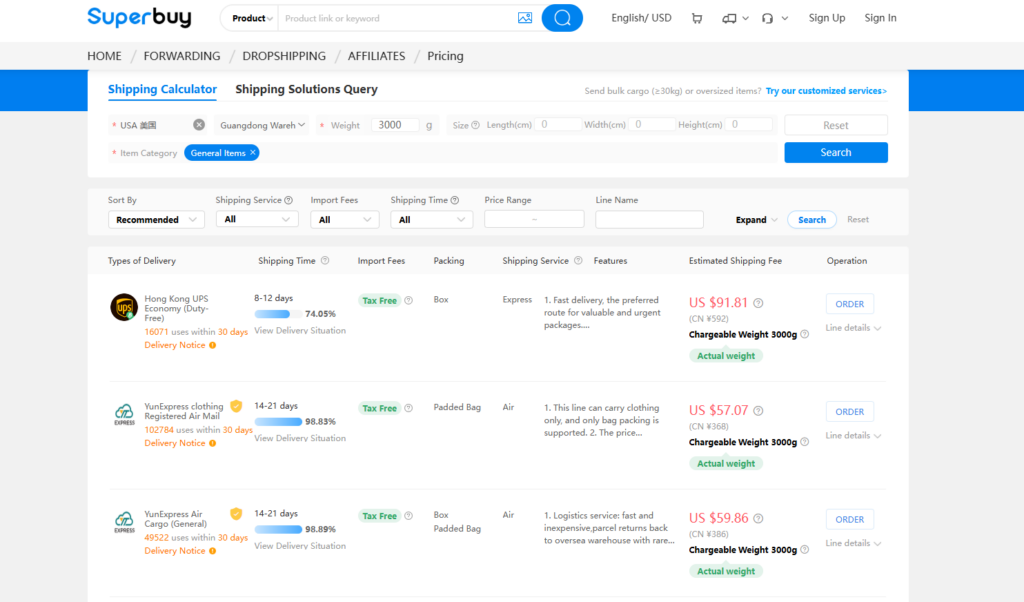
After clicking Search, Superbuy will display:
- Available shipping lines
- Estimated shipping cost
- Delivery time range
- Import fee options (if applicable)
Users can further filter results by:
- Shipping service
- Shipping time
- Price range
- Line name
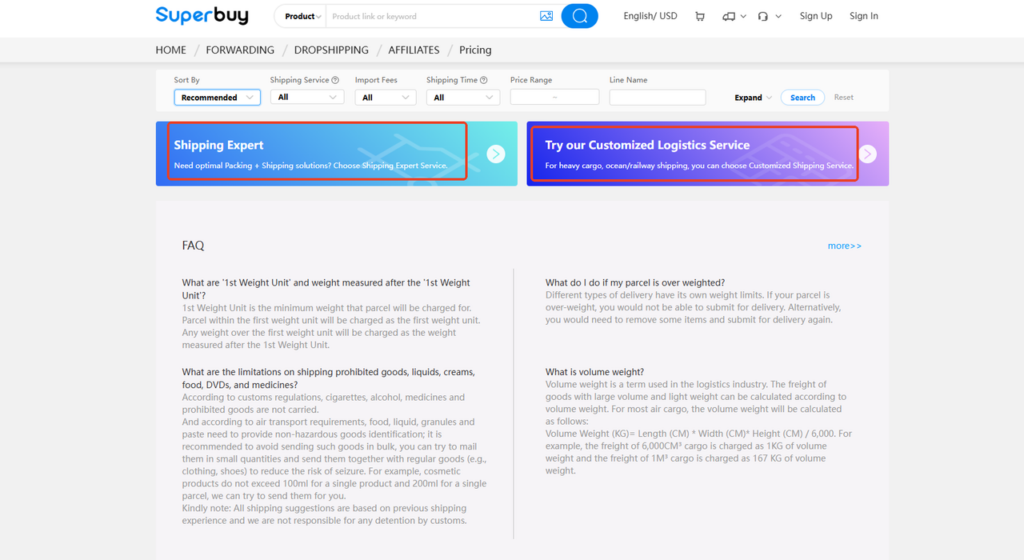
At the bottom of the page, Superbuy also highlights:
- Shipping Expert Service – for optimized packing and routing
- Customized Logistics Service – for heavy or oversized cargo
These options are useful for bulk buyers or high-value shipments.
How to Use the Mulebuy Shipping Calculator
Mulebuy uses a simplified tool called “Estimation”, focusing on speed and ease of use.
Step 1: Open the Mulebuy Estimation Tool

From the Mulebuy homepage:
- Click “Estimation” in the top navigation bar
- You’ll be taken directly to the shipping estimation page
This calculator is publicly accessible and can be used without logging in.
Step 2: Select Destination Country
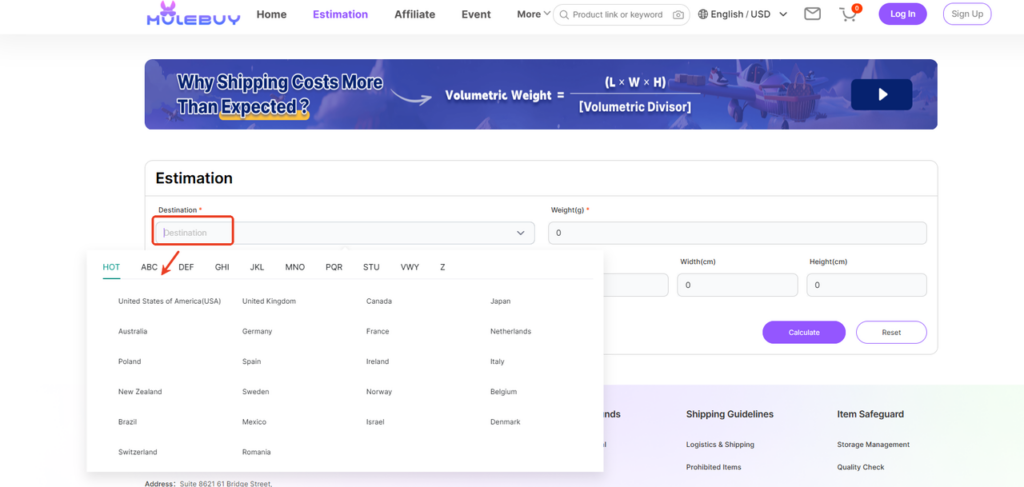
In the Destination field:
- Click the dropdown
- Choose your destination country (e.g. United States, UK, Canada, EU countries)
- Countries are grouped alphabetically (HOT / ABC / DEF, etc.)
📌 Mulebuy’s country selector is fast and intuitive, especially for popular destinations like the US and Europe.
Step 3: Enter Weight and Package Size
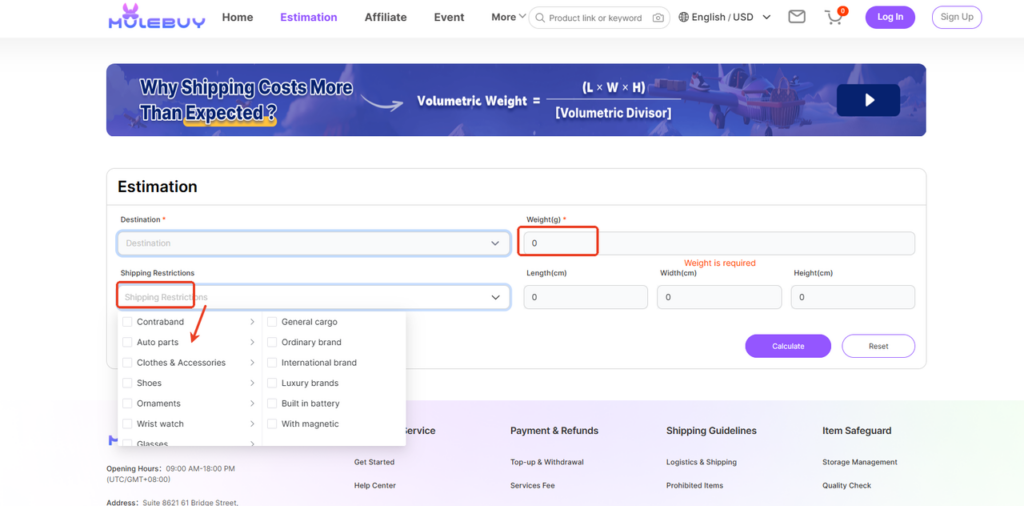
Next, input the basic package details:
- Weight (required) – in grams
- Optional but recommended:
- Length (cm)
- Width (cm)
- Height (cm)
If you leave dimensions empty, Mulebuy will calculate based on actual weight only, which may underestimate the final shipping cost if volumetric weight applies.
Step 4: Choose Shipping Restrictions (Item Type)
Mulebuy requires users to select Shipping Restrictions, which function similarly to item categories:
Common options include:
- General cargo
- Ordinary brand
- International brand
- Built-in battery
- With magnet
- Luxury brands
- Clothes & accessories
- Shoes
⚠️ This step is important because:
- Different restrictions affect available shipping lines
- Some lines only accept specific item types
Step 5: Compare Shipping Methods & Prices
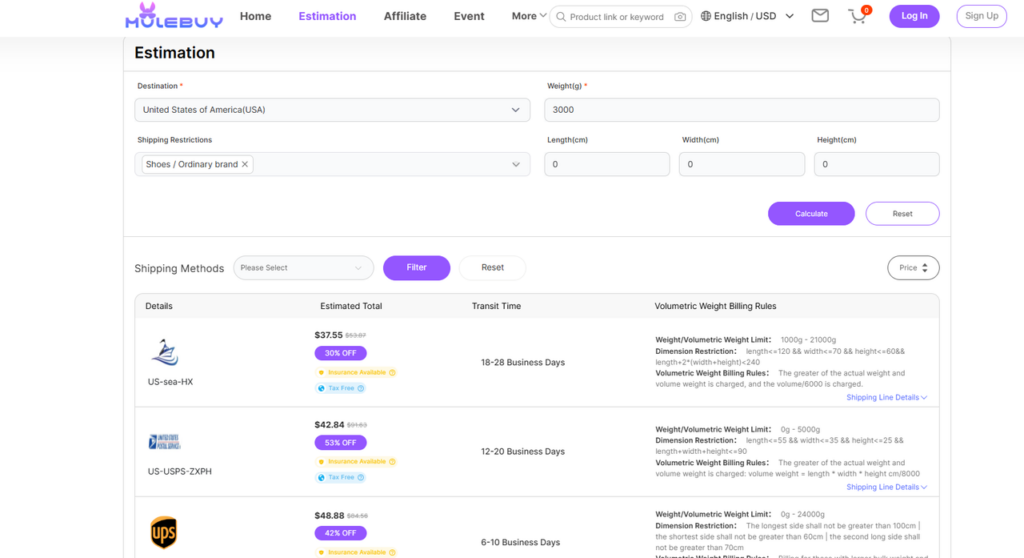
After clicking Calculate, Mulebuy displays:
- Multiple shipping methods
- Estimated total cost
- Transit time (e.g. 6–10 days, 12–20 days)
- Notes on insurance and tax-free options
- Volumetric weight billing rules (clearly shown per line)
Users can also:
- Filter shipping methods
- Sort by price or speed
How to Use Kakobuy Shipping Calculator
Kakobuy’s shipping calculator is labeled “Estimate” or “Shipping Fee Estimation”, and it closely resembles a traditional logistics quotation system.
Step 1: Access the Kakobuy Shipping Fee Estimation Page
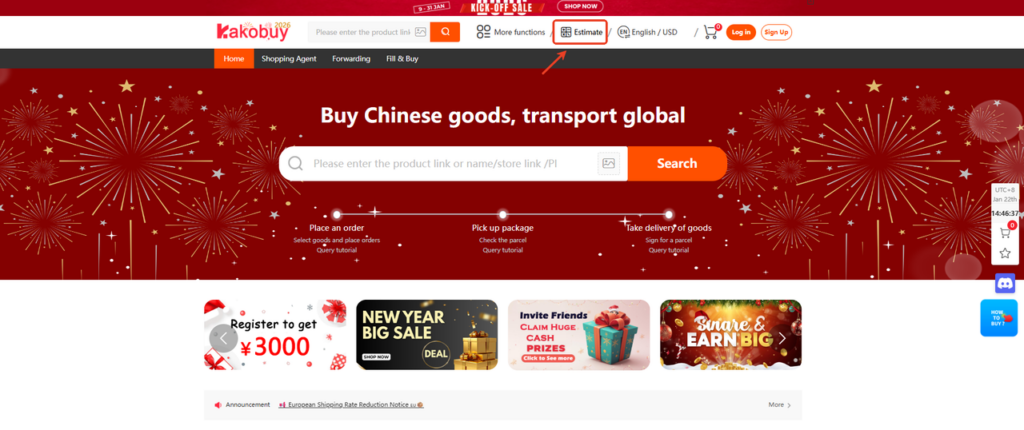
From the Kakobuy homepage:
- Click “Estimate” in the top navigation bar
- You’ll enter the Shipping Fee Estimation page
This tool is designed for users who want a line-by-line price breakdown.
Step 2: Select Destination Country
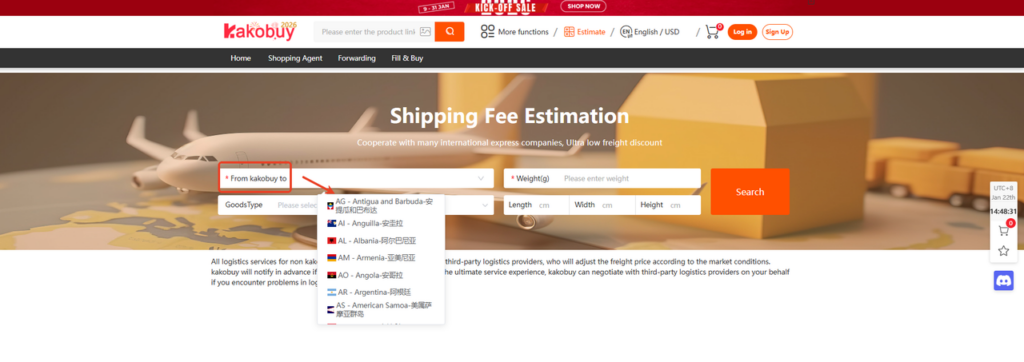
In the “From Kakobuy to” field:
- Choose your destination country (e.g. US – United States)
- Country list includes both country names and flags
This step determines:
- Available logistics providers
- Customs and tax handling rules
Step 3: Choose Goods Type
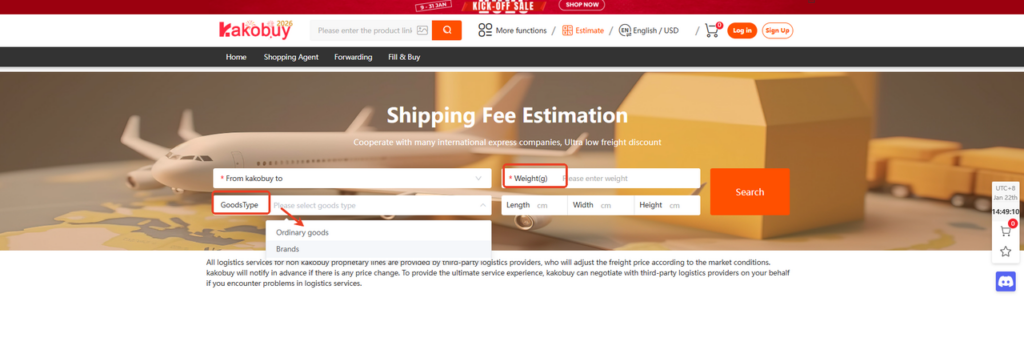
Kakobuy simplifies item classification into fewer options:
- Ordinary goods
- Brands
This is less granular than Superbuy or Mulebuy, but faster for general users.
📌 If you’re shipping branded items, selecting the correct goods type is essential to avoid unavailable lines.
Step 4: Enter Weight and Dimensions
Required input:
- Weight (g)
Optional but recommended:
- Length (cm)
- Width (cm)
- Height (cm)
Kakobuy clearly states when length, width, and height are required for certain shipping lines.
Step 5: View Shipping Cost & Transit Time
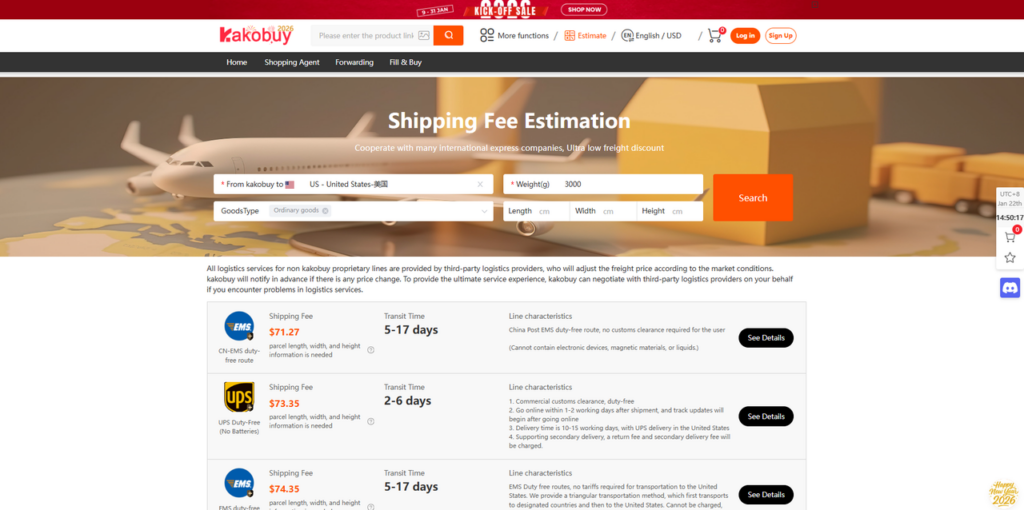
After clicking Search, Kakobuy displays:
- Shipping fee per line
- Transit time (e.g. 2–6 days, 5–17 days)
- Line characteristics (customs clearance, battery limits, liquids, etc.)
- “See Details” button for each logistics line
This layout is particularly useful for users who want to compare express vs economy lines.
How to Use the SUGARGOO Shipping Fee Estimation Tool
Sugargoo’s shipping calculator is one of the most beginner-friendly and structured options available.
Step 1: Open the Sugargoo Shipping Fee Estimation Page
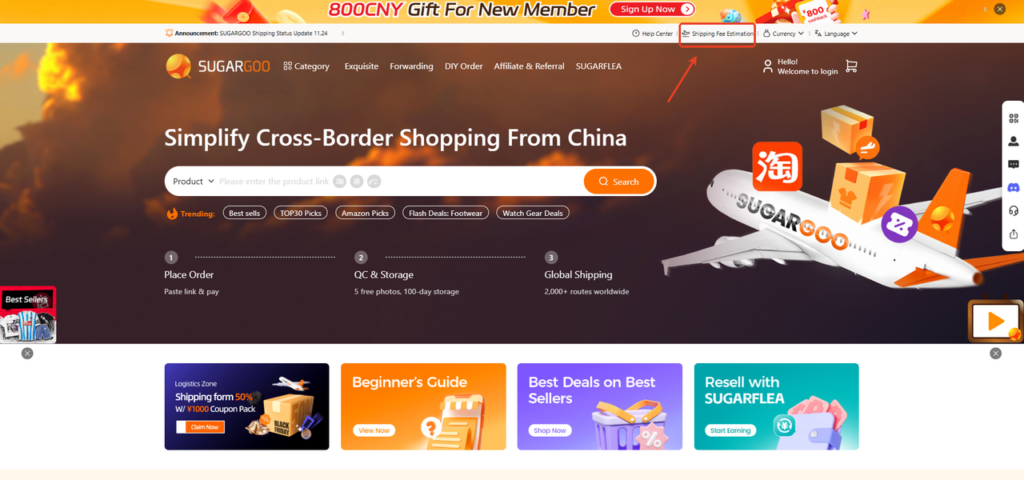
From the Sugargoo homepage:
- Click “Shipping Fee Estimation” in the top navigation bar
- You’ll be redirected to the dedicated estimation page
This tool is publicly available and can be used without logging in, making it ideal for first-time users.
Step 2: Select Destination Country and Province/State
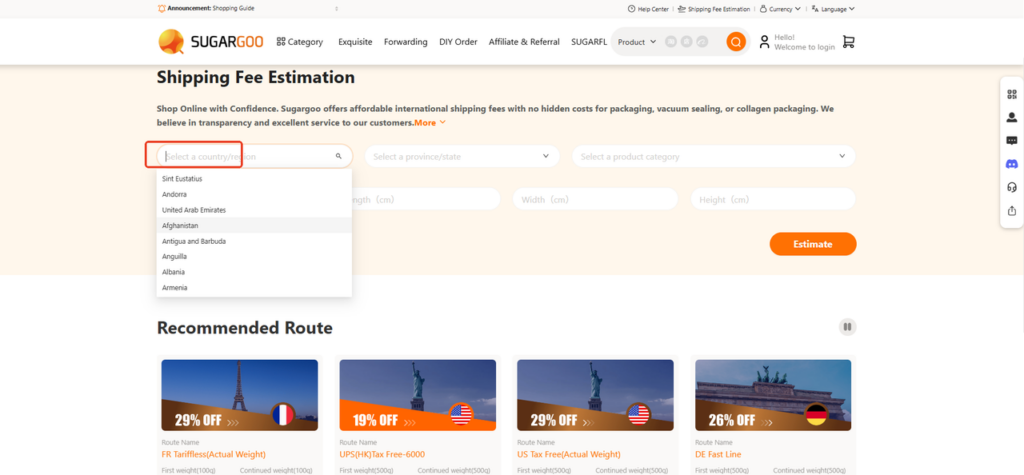
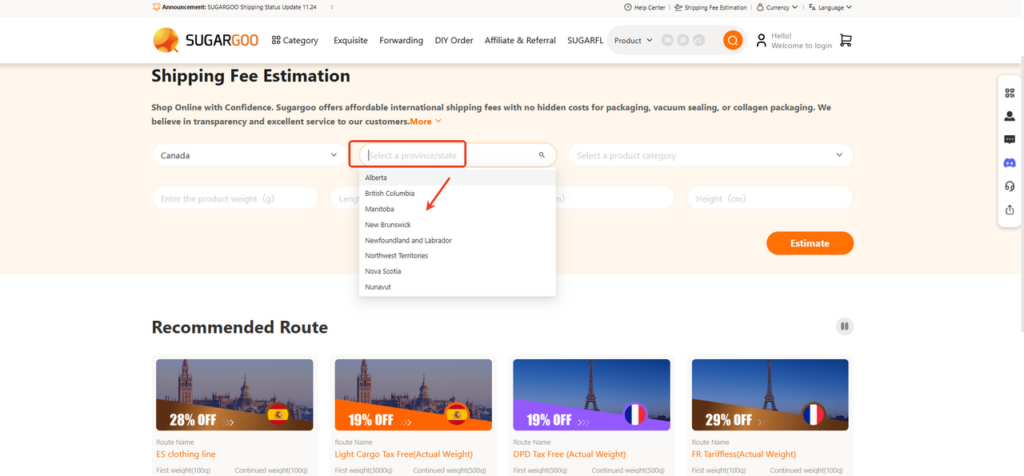
On the estimation page, start with location details:
- Select a country/region
- Choose your destination country (e.g. United States, Canada, UK, EU countries)
- Select province/state (if applicable)
- For countries like Canada or Australia, Sugargoo allows province-level selection
- This helps refine available routes and pricing accuracy
📌 This extra regional layer is something most other platforms do not offer, and it improves route precision.
Step 3: Enter Weight and Package Dimensions
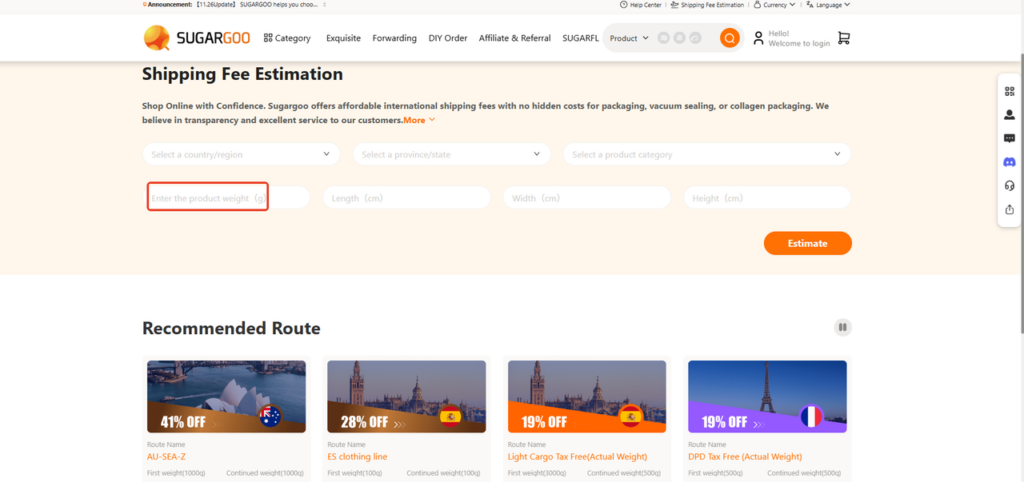
Next, input your parcel details:
- Product weight (g) – required
- Optional but recommended:
- Length (cm)
- Width (cm)
- Height (cm)
If dimensions are not entered, Sugargoo will calculate based on actual weight, but volumetric weight may apply depending on the route.
Step 4: Choose Product Category (Very Important)
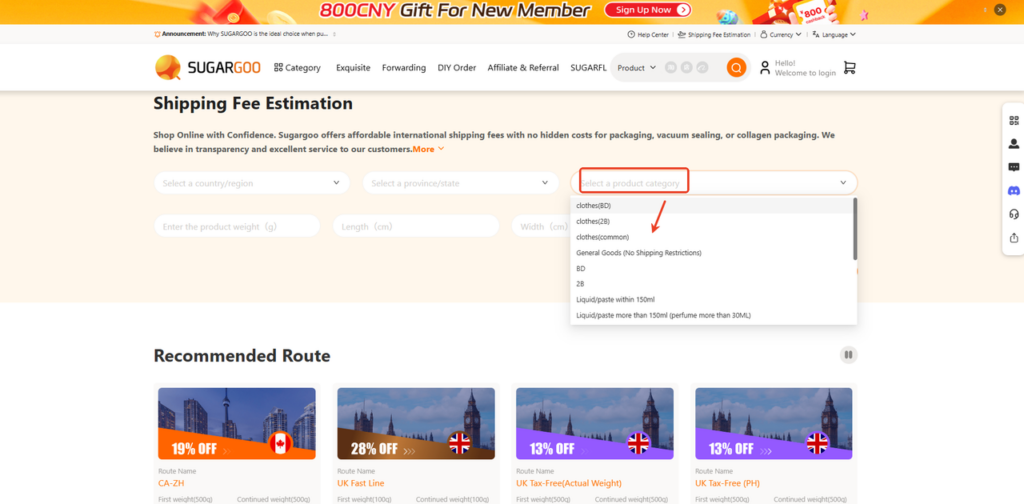
Sugargoo requires users to select a product category, which directly affects:
- Available shipping routes
- Whether an item is restricted
- Pricing and customs handling
Common category options include:
- Clothes (BD / 2B / common)
- General goods (no shipping restrictions)
- Liquid / paste within 150ml
- Liquid / paste over 150ml (perfume over 30ml)
- Special goods (batteries, cosmetics, etc.)
⚠️ Choosing the wrong category may result in:
- Missing available routes
- Inaccurate shipping estimates
Step 5: Review Shipping Cost Results (Sugargoo Example)
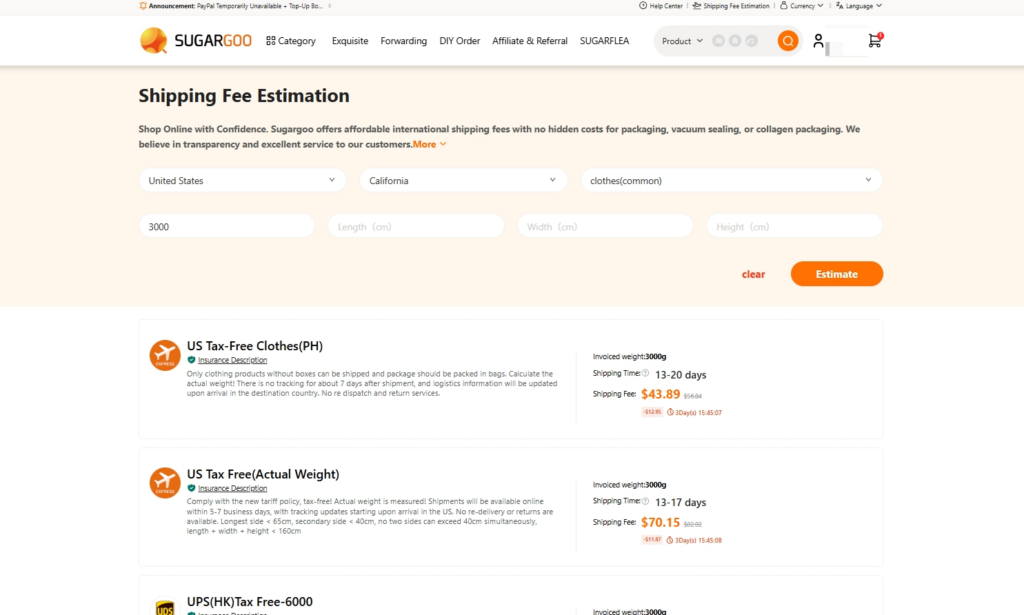
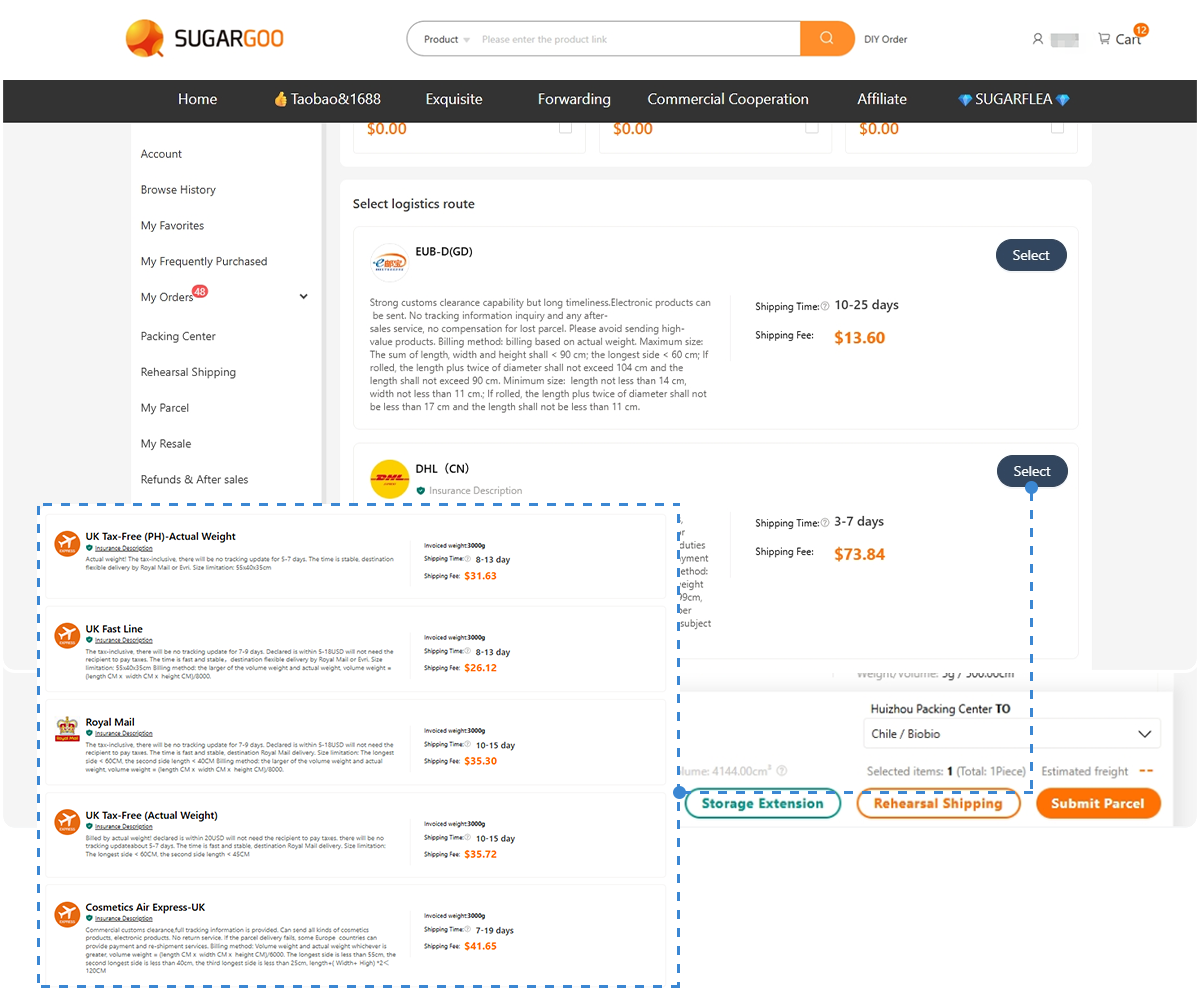
After clicking Estimate, Sugargoo shows shipping results in a clear, card-style layout.
Each shipping option displays:
- Route name (e.g. US Tax-Free Clothes, UPS Tax Free)
- Invoiced weight used for billing
- Estimated delivery time (such as 13–20 days)
- Final shipping cost, including any discounts
- Basic route notes, like item limits or packaging requirements
This layout makes it easy to compare shipping cost and delivery time at a glance and choose a route that fits both your item type and budget.
Step 6: View Recommended Routes and Discounts
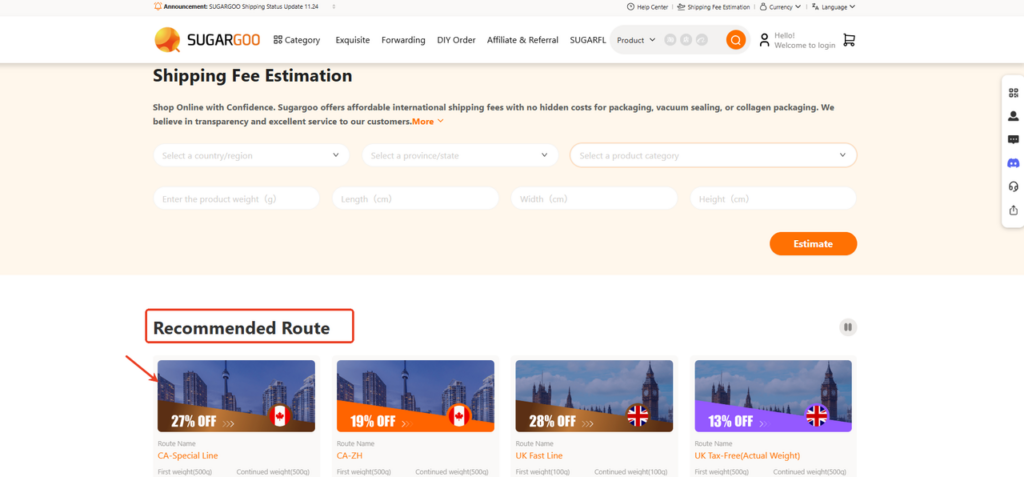
Sugargoo also displays a Recommended Route section:
Each route card shows:
- Route name (e.g. CA-ZH, UK Fast Line, US Tax-Free)
- Discount badge (e.g. 13% OFF, 28% OFF)
- First weight & continued weight pricing
- Destination country flag
This layout makes it extremely easy to:
- Compare tax-free vs standard routes
- Identify discounted shipping lines
- Choose routes optimized for speed or cost
📌 If you want to explore common shipping options for the U.S., Canada, Australia, the UK, Italy, Germany, France, the Netherlands, or Spain, you can refer to this route overview: 👉 Popular Destination Shipping Routes
Shipping Calculator Comparison Overview
| Platform | Shipping Calculator Type | Best Use Case |
| Superbuy | Advanced freight calculator | Complex & mixed items |
| Mulebuy | Simple shipping cost estimator | Quick estimates |
| Kakobuy | Express-focused freight cost calculator | Courier comparison |
| Sugargoo | Guided shipping fee estimation | Beginners & tax-free routes |
FAQ About Shipping Calculators
- Are shipping calculator results 100% accurate?
Not exactly. A shipping calculator is designed to give you a cost reference, not a final bill. In real orders, the shipping fee may change after your parcel is actually packed in the warehouse.
Common reasons include:
- The parcel taking up more space than expected (volumetric weight)
- Different packing methods, such as reinforced boxes or vacuum packing
- The item being classified under a different category by the warehouse
- Small adjustments caused by exchange rates or logistics pricing updates
That said, entering realistic weight, size, and item type usually keeps the final shipping cost close to the estimate.
- Why do some lightweight items have high shipping costs?
This usually happens because of volumetric weight, not actual weight.
Most international shipping lines charge based on whichever is higher:
- The parcel’s real weight
- The space it occupies in the cargo plane
For example, items like shoes, jackets, or backpacks may be light, but bulky. Even if they don’t weigh much, they still take up valuable space, which increases the shipping cost.
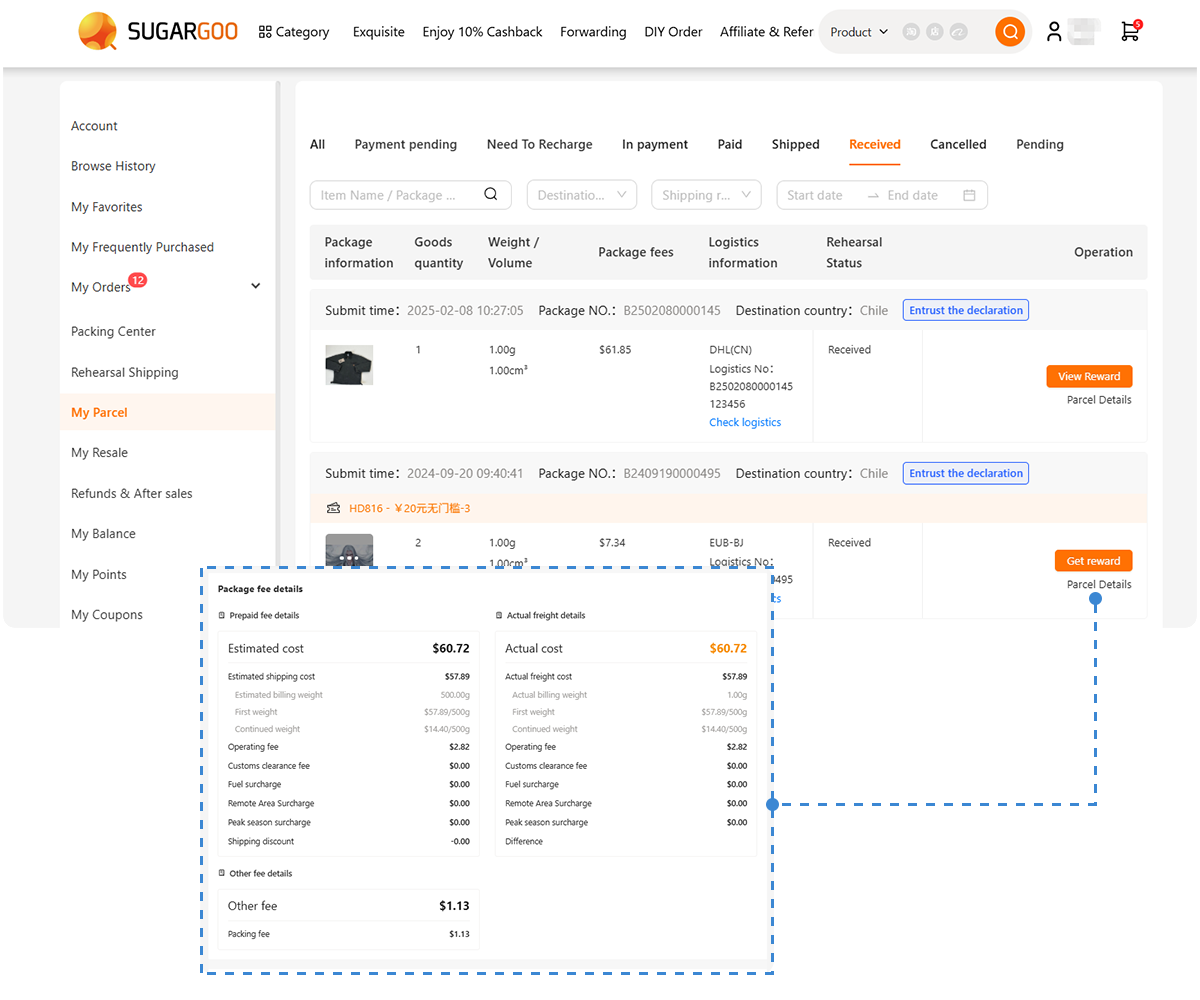
If you’re not yet sure how to correctly fill in Actual Weight and Volumetric Weight, you can read this guide: 👉 Sugargoo Pre-Shipment Package Simulation Guide It explains how weight is calculated and why it affects your final shipping fee.
- Is it necessary to enter package dimensions?
In many cases, dimensions are optional — but skipping them can lead to surprises later.
If you don’t enter length, width, and height:
- The shipping calculator may only calculate based on weight
- The final shipping fee can increase after warehouse repacking
If you already know the approximate size of your item, adding dimensions gives a more realistic shipping estimate.
- Why do shipping calculators ask about item categories or restrictions?
Item categories are used to decide how your parcel can be shipped, not just how much it costs.
They affect:
- Which shipping lines are available
- Whether the item is considered sensitive (battery, liquid, branded goods, etc.)
- Customs handling and eligibility for tax-free routes
Selecting the wrong category may cause certain shipping options to disappear or lead to delays later.
- Which shipping calculator is easier for beginners?
For first-time buyers, calculators that guide you step by step are usually easier to use.
Beginner-friendly tools often:
- Recommend suitable shipping routes automatically
- Highlight tax-free or discounted lines
- Show results in clear cards instead of technical logistics tables
These features help reduce confusion when estimating shipping costs for the first time.
- Should I compare shipping costs across different platforms?
Yes — and it’s one of the smartest things you can do.
Different platforms may:
- Work with different logistics providers
- Offer different tax-free shipping routes
- Use different volumetric weight formulas
Checking more than one shipping calculator can help you spot price differences and choose the option that fits your budget and delivery expectations.